Anders Hesselbom
Programmerare, skeptiker, sekulärhumanist, antirasist.
Författare till bok om C64 och senbliven lantis.
Röstar pirat.
CodeSearchTree use case: Read constant values
2015-12-23
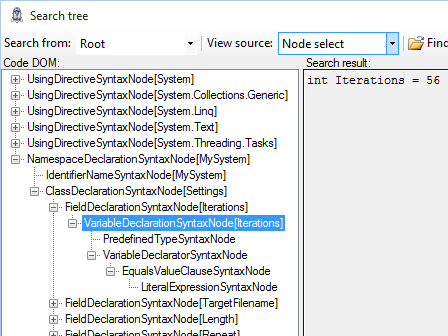
For this example, I am using Visual Studio 2015 Community edition to create a console application. Make sure that you are using .NET Framework 4.6 or later. Let’s say that you have a .cs file with constants that looks something like this:
using System;
using System.Collections.Generic;
using System.Linq;
using System.Text;
using System.Threading.Tasks;

namespace MySystem
{
  public class Settings
  {
    public const int Iterations = 56;
    public const string TargetFilename = @"C:\Output\log.txt";
    public const int Length = 128;
    public const bool Repeat = true;
  }
}
You want to know the names and values in this file. Let’s start from the beginning. In my console application, I want a reference to the CodeSearchTree – I accept your complements for my choice of name. Just to be on the safe side, I specify the name of the project that use the CodeSearchTree library from when I add the package in the Package Manager Console.
Get-Project MyProject | Install-Package CodeSearchTree
In the Main function, first declare the filename variable, then:
//Load and parse the source file.
var tree = CodeSearchTree.Node.CreateTreeFromFile(filename);
//Get the first constant.
var f = tree.GetChild("ns/cls/field");
//Display name and value and get the next constant.
while (!(f == null))
{
  if (f.NodeType == CodeSearchTree.NodeType.FieldDeclarationSyntaxNode)
  {
    //Display...
    var n = f.Name;
    var x = "vardeclaration/vardeclarator/equalsvalue/literal";
    var v = f.GetChild(x).Source;
    Console.WriteLine($"Name: {f.Name}, Value: {v}");
  }
  //Get next...
  f = f.GetNextSibling();
}
If you are unsure about the path strings in your C# tree, try to drop your file on the test client. Happy searching!
Categories: C#
Tags: CodeSearchTree
En kopp kaffe!
Bjud mig på en kopp kaffe (20:-) som tack för bra innehåll!


Följ mig

|

|

|

|

Leave a Reply