This small piece of Visual Basic code (VBx) shows how you can do a multithreaded sockets server in just a few lines of code. I write all of this code in a console application. The main module will only hold an implementation of the Main function. Like so:
Module Module1

    Sub Main()
      Dim L As New System.Net.Sockets.TcpListener(
         New System.Net.IPAddress({192, 168, 1, 100}), 80)
      L.Start()
      Dim ThreadCounter = 0
      Do
         ThreadCounter += 1
         Dim C = L.AcceptTcpClient()
         Dim S As New NetSession(C, ThreadCounter)
         Dim T As New Threading.Thread(AddressOf S.SessionLoop)
         Console.WriteLine("Starting thread " & ThreadCounter.ToString() & ".")
         T.Start()
      Loop
    End Sub

End Module
Note that I have hard coded my local IP address, and passed it as an argument to the TcpListener constructor, but there are easy ways collect this information using the .NET Framework. The variable C is a System.Net.Sockets.TcpClient, because that is what the AcceptTcpClient function returns. The ThreadCounter is just so that different connections will get a unique session identifier.
The rest of the code takes place in the NetSession class.
Public Class NetSession

   Private mC As System.Net.Sockets.TcpClient
   Private mS As System.Net.Sockets.NetworkStream
   Private mThreadCounter As Integer
   Private mIndex As String

   Public Sub New(ByVal C As System.Net.Sockets.TcpClient,
         ByVal ThreadCounter As Integer)
      Me.mC = C
      Me.mThreadCounter = ThreadCounter
      Me.mIndex = ""
   End Sub

   Public Sub SessionLoop()
      Me.mS = Me.mC.GetStream()
      Me.mC.LingerState.Enabled = False
      Me.WriteLine("Connected.")
      While Me.mC.Connected
         If Me.mS.DataAvailable Then
            Dim GotData As New System.Text.StringBuilder()
            While Me.mS.DataAvailable
               Dim bytes(Me.mC.ReceiveBufferSize - 1) As Byte
               Dim Len = Me.mS.Read(bytes, 0, Me.mC.ReceiveBufferSize)
               If Len > 0 Then
                  GotData.Append(System.Text.Encoding.UTF8.GetString(bytes, 0, Len))
               End If
            End While
            Dim D = GotData.ToString().Trim()
            If Not D = "" Then
               If Not Me.Handle(D) Then
                  Exit While
               End If
            End If
         End If
      End While
      Me.mS.Close()
      Me.mS.Dispose()
      Me.mC.Close()
      Console.WriteLine("Thread " & Me.mThreadCounter.ToString() & " is closing.")
   End Sub

   Private Sub WriteLine(ByVal T As String)
      Dim Bytes() As Byte = System.Text.Encoding.UTF8.GetBytes(T & ControlChars.CrLf)
      Me.mS.Write(Bytes, 0, Bytes.Count)
   End Sub

   Private Function Handle(ByVal D As String) As Boolean
      Console.WriteLine("Thread " & Me.mThreadCounter.ToString() & ": " & D)
      If D.ToLower() = "quit" Then
         Me.WriteLine("Bye.")
         Return False
      Else

         'Do parsing here! Return True no matter what.
         Me.WriteLine("Thanks!")

         Return True
      End If
   End Function

End Class
The constructor accepts the TCP client (representing the connected application) and the ThreadCounter variable. The SessionLoop function is the main loop for each thread.
The WriteLine function sends responses to the connected client application and the Handle function is the place where you implement your parsing (or invokes some existing parser). Note that the Handle function must return True, even if your parsing fails. Failed parsing should render in an error message to the client application, but the function should still return True. The returning of the value False, is a signal that the client disconnects.
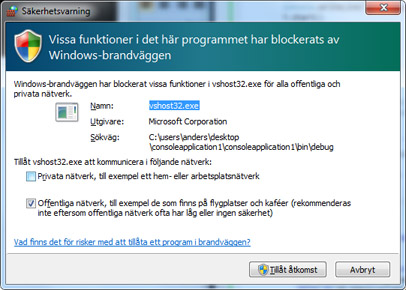
When you run this code, you will get a warning from your Windows Firewall (I run a Swedish Windows 7 installation). Accept that this program can use your local network.
To make this program actually do something, start a sockets client, like PuTTY. Configure it like so:
Host IP: [Your local IP]
Port: 80
Encoding: UTF-8
Note that we use UTF-8 encoding to convert between byte arrays and strings in the source code, so the TCP client must also use UTF-8.
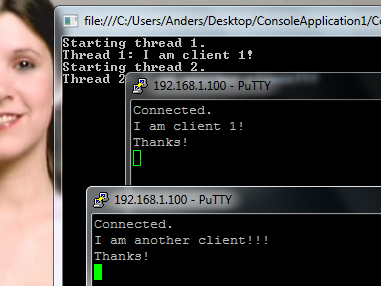
Since our server is multithreaded and have multiple connection awareness, you can connect more than one sockets client to your application.
Send Quit from your client application to quit.