Anders Hesselbom
Programmerare, skeptiker, sekulärhumanist, antirasist.
Författare till bok om C64 och senbliven lantis.
Röstar pirat.
Visual Basic: The coolest code editor you ever saw
2011-03-23
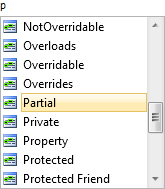
Let’s say that you’re typing a word.
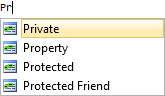
As you type…
…the IntelliSense filters out the word you are typing.
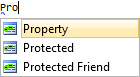
If you type something that isn’t in the list, the list is closing.

If you decide that the last character you typed is wrong, use backspace to delete it. Instantly, the IntelliSense is displayed again, with the possible option selected.
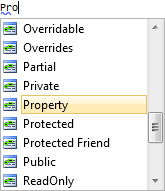
The C# editor has a behavior that is similar to this, but if you go pass an membership access operator, or something like that, the C# IntelliSense is completely lost. You can bring it up again by deleting the line, and start typing again, or by pressing Ctrl+J. The Visual Basic editor picks up automatically, as shown above, whenever you press backspace to delete a word.
Another big advantage in the Visual Basic editor is the enumeration awareness. The Visual Basic editor recognizes when an enumeration is an available option, and provides possible options from the right location in the framework. The C# editor seems very unaware of enumerations, and you might have to look up enumerations that you are unfamiliar of, in the Object Browser by pressing Ctrl+Alt+J.
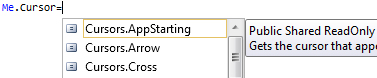
Demonstrated here:
Categories: Visual Studio 10
En kopp kaffe!
Bjud mig på en kopp kaffe (20:-) som tack för bra innehåll!


Följ mig

|

|

|

|

Leave a Reply