Anders Hesselbom
Programmerare, skeptiker, sekulärhumanist, antirasist.
Författare till bok om C64 och senbliven lantis.
Röstar pirat.
.NET controls in Microsoft Access
2010-05-05
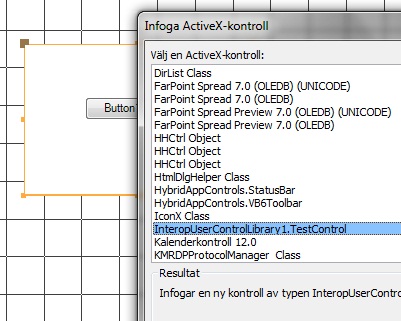
Creating ActiveX objects in Visual Basic .NET is easy from Visual Studio 2008. There are a few checkboxes to tick, and a class attribute to add. But if you are doing an ActiveX control for use in let’s say an Microsoft Access application, there are some requirements that must be met, otherwise Access will not list your control. Of course, Microsoft gives you a template for this, and then you´re off. Thanks to Håkan Ståhl for pointing out this template to me.
Create a VB6 Interop UserControl project. The project that is shown on the screenshot below uses the standard name InteropUserControlLibrary1. I already hold a control. To rename the control, rename all three files (the vb file, the manifest and the bitmap). When the vb file is renamed, you will be asked if you want to rename the references too. Do that. Finally, fix the broken references in the manifest file (enter the new name in the progid attribute and the name attribute). Now you´re on your way. You can add a test project to the solution and start coding. The control is registered when you compile the project.
Categories: Visual Basic 8
Tags: ActiveX
En kopp kaffe!
Bjud mig på en kopp kaffe (20:-) som tack för bra innehåll!


Följ mig

|

|

|

|

Leave a Reply